
Objective - finding the admin panel
This lab has an unprotected admin panel - one that doesn't check in any way whether the person visiting it has administrator privileges. The panel is located at an "unpredictable" URL, but that URL is disclosed somewhere in the application. To complete the lab, we need to find this URL and then use the panel to delete a user named Carlos.
Step 1: analyzing the page's source code
In the previous lab in this series, we found the admin panel's URL in the robots.txt file. This time the creators decided to hide it a bit better - the URL is randomly generated each time the lab is launched, so we won't guess it from a dictionary of typical paths (/admin, /panel, /administrator-panel, etc.). Gobuster won't help here. The URL is, however, not so "unpredictable" as it seems.
Let's take a look at the home page's source code. We'll find the following fragment:
<script>
  var isAdmin = false;
  if (isAdmin) {
    var topLinksTag = document.getElementsByClassName("top-links")[0];
    var adminPanelTag = document.createElement('a');
    adminPanelTag.setAttribute('href', '/admin-vtdbfx');
    adminPanelTag.innerText = 'Admin panel';
    topLinksTag.append(adminPanelTag);
    var pTag = document.createElement('p');
    pTag.innerText = '|';
    topLinksTag.appendChild(pTag);
  }
</script>
This is a very interesting piece of code - and quite a funny URL! But let's pay attention to what else is going on in the code.
The script checks the isAdmin variable. If this variable had the value true, a link to the admin panel pointing to /admin-vtdbfx would be added to the menu at the top of the page. In our case, isAdmin is set to false, so the link will never be displayed.
But whether or not the link shows up in a place visible to the user on the page doesn't matter at all. The logic deciding whether the panel should be displayed is being served to us, on a silver platter, bby the JavaScript found in the page source. If isAdmin = true was the case, this code would add the appropriate elements to the DOM tree, along with a link to the administrator's subpage. Everything we need to solve the lab is on the client side.
And here lies the crux of this lab: if something is hardcoded in the source code or generated when you enter the page (and readable within an active session), then it's not an unpredictable URL. Unpredictability of a URL would only - maybe - make any sense if the URL weren't disclosed anywhere to a person without privileges, but it would be still possible to find it anyway... But here it's served up on a silver platter.
Step 2: looking at the /admin-vtdbfx address
So let's check this address - in my case it was https://0af200c00430be4c8030a82d00da00d4.web-security-academy.net/admin-vtdbfx (in your case the random part of the URL will be different). An admin panel with a list of users appears before our eyes:
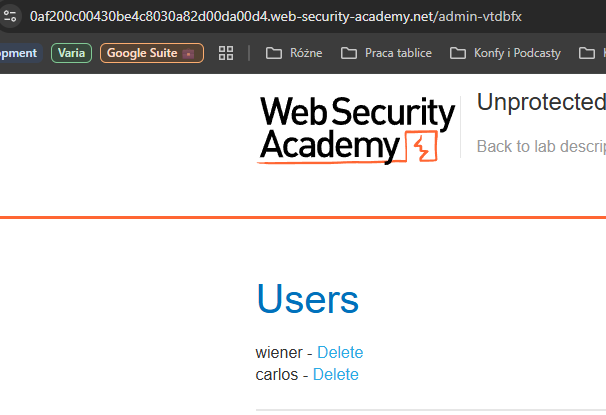
And that's a wrap. We click Delete next to the user named Carlos - and thereby solve the lab.
What else can you find in the source code?
Today's lab was about a find in the page's source code - a theoretically unpredictable URL to the admin panel. But a web application's source code can reveal a lot more. Among other things, you can find:
- the Google Tag Manager tag - such information can be used, for example, in phishing: by sending an email tied to one of the services actually used on the site, which lends credibility to the attack;
- information about the plugins in use - e.g. through the URL of the directory the files are loaded from, which - at least in the case of WordPress - can be attributed to a specific plugin;
- information about software and plugin versions - e.g. the WordPress Yoast SEO plugin automatically adds a comment with the version in use; the LiteSpeed Cache plugin, among others, behaves similarly:
<!-- This site is optimized with the Yoast SEO plugin v26.6 - https://yoast.com/wordpress/plugins/seo/ -->
<!-- Page cached by LiteSpeed Cache 7.7 on 2025-12-31 05:23:16 -->
WordPress also often adds version information at the end of CSS file URLs:
<link rel='stylesheet' href='https://adres-strony.pl/wp-includes/css/dist/block-library/style.min.css?ver=6.9' type='text/css' media='all' />
In this case it's the address of the styles for block elements - part of WordPress's low-code/no-code capabilities, i.e. the Gutenberg editor. The ?ver=6.9 parameter, in turn, gives away the version of the engine.
Each such piece of information on its own looks harmless, but together they build a picture of the site that an attacker can use in the next phase of the attack - for instance, by picking exploits tailored to specific software versions known to be vulnerable.
How to protect yourself?
Sometimes there isn't much you can do. You can try to hide everything, but hiding tends to be time-consuming, and sometimes even impossible - especially when subsequent software updates overwrite the changes you've made. Risk analysis is what helps decide whether the game is worth the candle.
Regardless of it, it's always worth:
- keeping software up to date - even if someone learns a plugin's version, it's much harder for them to exploit it when the plugin is current and free of known vulnerabilities;
- not installing new software right away - it's often worth waiting 24-48h for any bugs to be found and fixed. Though it's also worth remembering that when it comes to critical flaws or systems, time matters, and it's better to apply a patch that might carry another, still-unknown flaw than to be left exposed as a target for cybercriminals;
- knowing how to protect yourself against phishing - checking the URL and using a password manager that will offer to fill in a password only on the correct domain (if it doesn't - that's a warning sign);
- not hardcoding data in the source code that we wouldn't want to show to outsiders - even if it isn't displayed on the page. As this lab showed, "invisible" to the average user doesn't mean "inaccessible".